There was a time when you thought of starting your own business, creating products and selling them, but later realized you didn't know how to market them.

So what happened? You went to an agency, but sometimes they have time, sometimes they don't. You let them handle it, but you don't know what to do. In this article, you'll learn how to finish and upload your posts without wasting too much time, and increase productivity.
Why Most D2C Captions Fail to Convert
While creating a product is one thing, marketing it is quite another. There are many marketing methods, but today we'll focus solely on social media marketing. Social media marketing isn't very expensive. Most new founders focus on social media.

But what most founders don't realize is that captions are rarely understood, and rarely discussed. Social media users reach you based on keywords in your captions. This is a small but very useful topic. If you work without ads, your captions are your only marketing tool—and they work hardest when your Instagram feed is structured like a storefront, not a random photo dump. And the more people comment on your captions, the more the algorithm pushes you.
Captions Without Clear Message Strategy
Some founders don't write captions, and some have ChatGPT or other AI write captions. But both are wrong. Captions aren't just for show; they're meant to convey your message to customers and encourage them to buy. It's just like ad copy; if your product is unique or new to the market, it may also need to educate. When writing captions, include a hook, a narrative body, and a call to action, just like you would for videos. Because the algorithm pushes your profile based on the caption.
Hashtag Mistakes That Reduce Organic Reach
When it comes to captions, you'll probably add hashtags anyway. However, there are rules for using hashtags. Dumping dozens of irrelevant tags on every post rarely helps—you can look spammy to the platform, and the wrong people see your post.
At most, 5-7 hashtags on any platform is enough for any brand (in the framework below, we tighten that to 3-5 hyper-targeted tags that match the caption). A common mistake we make here is using trending hashtags in order to gain reach. This mistake should never be made because trends have high traffic anyway, and there's no guarantee you'll want to increase reach in a hurry. This can stop your profile from growing organically, and you won't be able to reach your potential customers.
One final point: don't depend only on "share my post" pods or random share-for-share groups without real engagement—that rarely builds the organic audience quality you want.
The algorithms of today's modern platforms have become so smart that they can even use semantic keywords within text and without tags. This means that certain words in captions can act as hashtags.
For example, "The #sun gives us light, but nothing is better than an earthen lamp in the dark." So it became a hashtag.
3-Step Framework to Write Captions That Sell
In this article, we'll explore how to write high-converting captions. Step-by-step, we'll look at some frameworks that can help you reach more visitors, some of which are quite unique.

Step 1: Start With a Scroll-Stopping Hook
As you know, the first 5 seconds of a video are crucial to attract users. Similarly, the first 50 characters of the caption are equally important to ensure visitors don't leave without reading your message.
50 characters, or headline, is called above the fold in the world of copywriting. When a user scrolls through Instagram, TikTok, or LinkedIn, they don't see the entire caption; they only see the first 1-2 lines, with the "...more" option hidden behind them. And the purpose of 50 characters should be: Pattern Interruption, meaning it should stop the user from scrolling and arouse their curiosity.
4 Hook Patterns for the First 50 Characters
- The Counter-Intuitive Hook (Shocking Truth)
- Challenge common misconceptions by stating the exact opposite of conventional wisdom; it stops the scroll and boggles the mind.
- The Curiosity Gap (Open look)
- You tell them half the story and hide the other half. The human mind cannot tolerate incomplete stories.
- The Direct pain Point (targeted Call out)
- Directly point your finger at the customer's biggest pain point.
- The Aggressive Stat/Number
- People's eyes ball quickly catch on to numbers. This makes your message authentic.
| Hook Type | Exact Example Text | Character Count | Core Emotion |
|---|---|---|---|
| Negative Warning | "Don't wear black linen shirts until..." | 36 Chars | Fear of making a mistake |
| The Fast Result | "Clear skin in 12 days without lasers:" | 38 Chars | Desire for quick solution |
| Industry Secret | "What clothing brands never tell you:" | 36 Chars | Curiosity / Insider info |
The Golden Rule: Never include a brand name ("Welcome to BrandX"), a boring welcome ("Hey guys!"), or a hashtag in the first 50 characters. This is the most expensive real estate, use it only to grab customer attention. Your context-aware tool works on this very science. When the founder sets their niche, your tool will automatically generate such 50-character scroll-stopping hooks for them.
Step 2: Connect Product Features to Buyer Emotion
After your hook successfully interrupts the pattern, the narrative body has one job: answer the user's burning question, "What's in it for me?"
The most common pitfall for founders is listing dry product specs. Remember, customers aren't looking for technical metrics or raw factor; they are searching for solutions to their daily struggles and lifestyle shift.
For high-converting copy, you must bridge the gap by translating physical features into real human desires and relatable survival scenarios.
The Rule of Thumb: Never list a feature without pairing it with a real-world scenario. Instead of telling them what your product is made of, show them how it fits seamlessly into their daily survival or lifestyle enhancement.
Step 3: Use One CTA and 3-5 Relevant Hashtags
You have stopped the scroll with a powerful hook and built desire through real-world use cases. Now, it is time to close the deal. This is where most founders lose the sale because they either forget to tell the reader what to do next, or they overwhelm them with a messy cloud of 30 generic hashtags.
To convert attention into revenue, you need to execute two things perfectly: a singular, frictionless Call-to-Action (CTA) and an algorithmic indexing strategy using 3 to 5 targeted hashtags.
Use a Single, Frictionless Call to Action
When you ask an audience to "Like this post, tag a friend, leave a comment, and click the link in our bio to buy," you give them too many choices. In marketing psychology, choice overload leads to decision fatigue. The user ends up doing absolutely nothing and scrolls away.
Your caption must have one clear job. Remove all friction by picking a single action based on your campaign goal:
- For Direct Sales: "Tap the link in our bio to claim your summer linen shirt before stock runs out." (Urgency + Single Action)
- For Engagement/Community: "Drop a ☕ below if you have faced this morning energy crash." (Low Effort + High Relatability)
- For Retention: "Save this post so you don't forget these three skincare steps tonight." (Value-Driven Utility)
Follow a 3-5 Niche Hashtag Strategy
Many founders still treat hashtags like a lottery system, copy-pasting the same 30 ultra-broad tags like #fashion, #love, or #trending into every single post.
Modern social media platforms use advanced Semantic SEO. The algorithm reads your caption text, categorizes your video, and scans your tags to understand exactly who should see your post. Broad hashtags bury your content under millions of competing posts within seconds. Hyper-targeted, low-competition tags index your content for users who are actively searching for your solution.
Drop the 30-tag spam cloud and use a strict 3-to-5 hashtag formula:
- Tag 1: The Macro Category (High Volume): Defines your industry (e.g.,
#CleanSkincare). - Tag 2: The Specific Problem (Mid Volume): Targets the consumer's pain point (e.g.,
#AdultAcneSolutions). - Tag 3: The Core Product Utility (Low Volume): Targets the exact solution (e.g.,
#SalicylicAcidSerum).
Frictionless Copy Tip: Always separate your hashtags from your main body copy using a clean line break. Keep your text clutter-free so it reads naturally for the consumer while remaining perfectly indexed for the platform's algorithm.
How to Create High-Converting Captions

I understand that founders don't have much time to write captions from scratch every day. That is why our tool helps you handle the full caption workflow in one place.
You can set your hooks, branding rules, and content style once, then reuse them whenever you want. If you have not loaded brand rules yet, start with the Settings walkthrough in 3 Instagram Blunders D2C Founders Make—this section focuses on Research → Generate for captions.
Step-by-Step Workflow in SocialShare
After coming to home, first of all you have to enter and add your competitor's site if it is there.
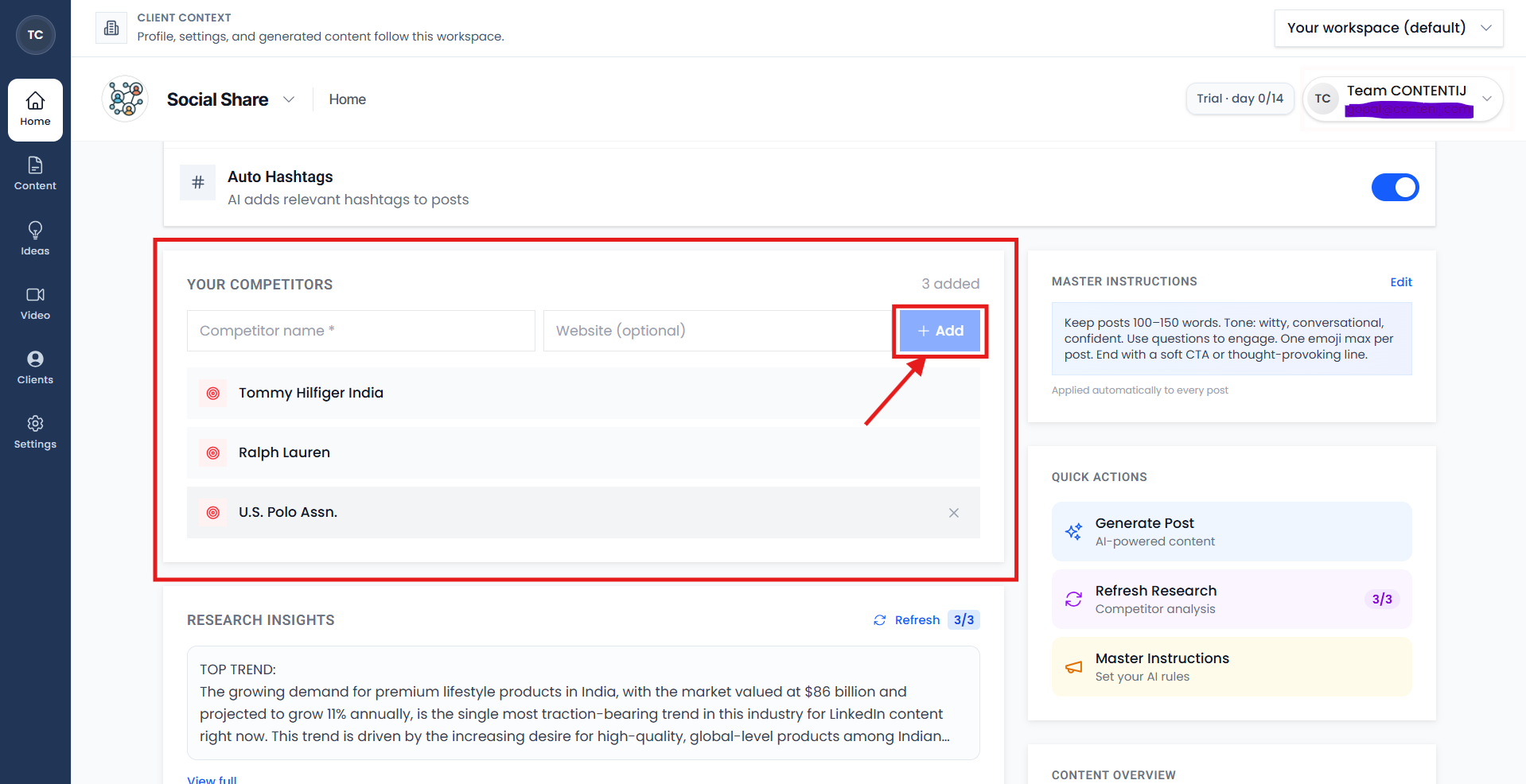
Then, click on Research. The tool analyzes market trends and your competition to help you prepare a proper strategy and understand your brand's potential.
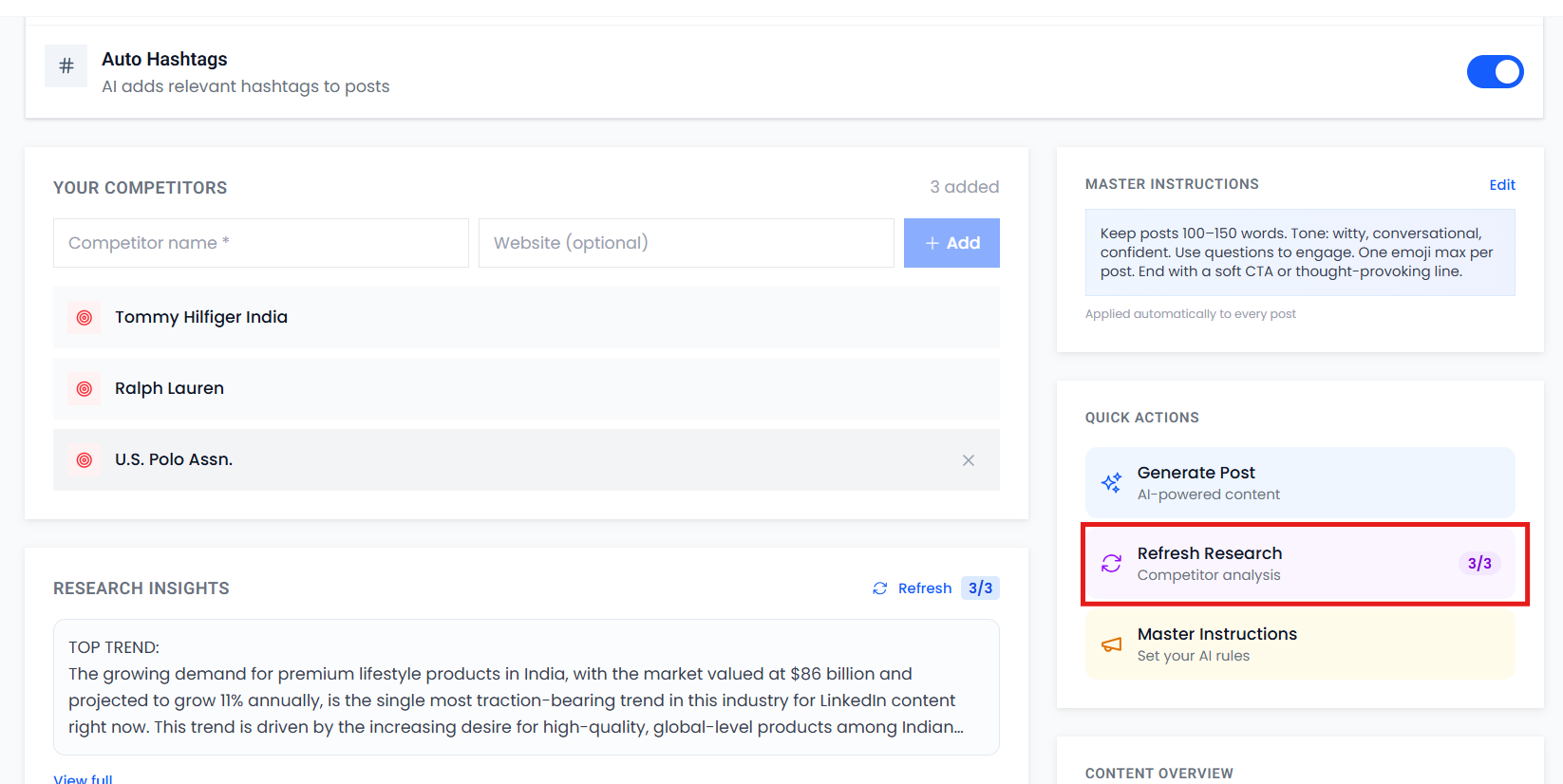
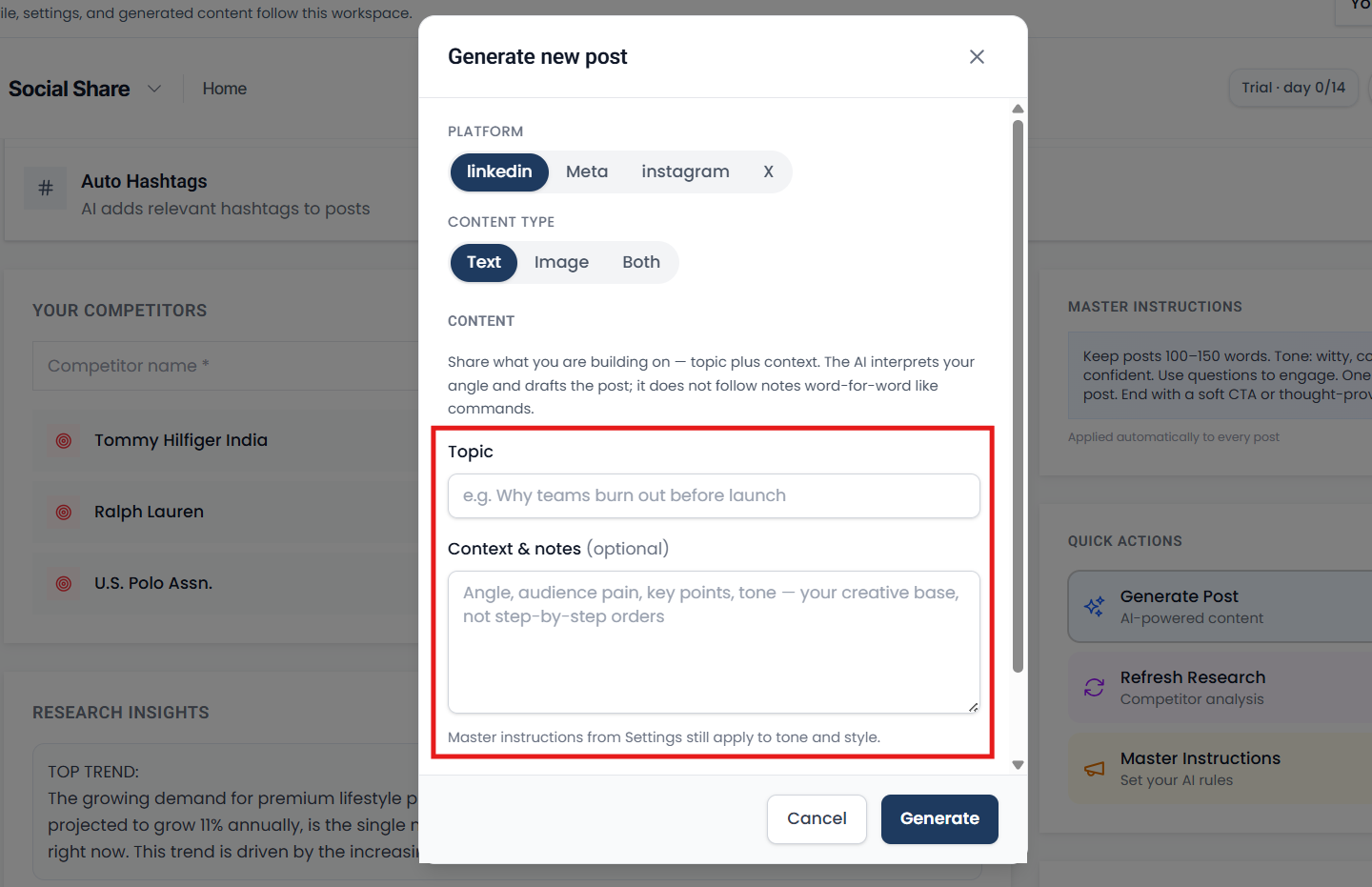
After Research, click on Generate Post, select the platform for which you want the caption generated, and add your topic and details.
Text will be selected by default, and click on Generate. A ready-made caption will be generated in 5-7 seconds.
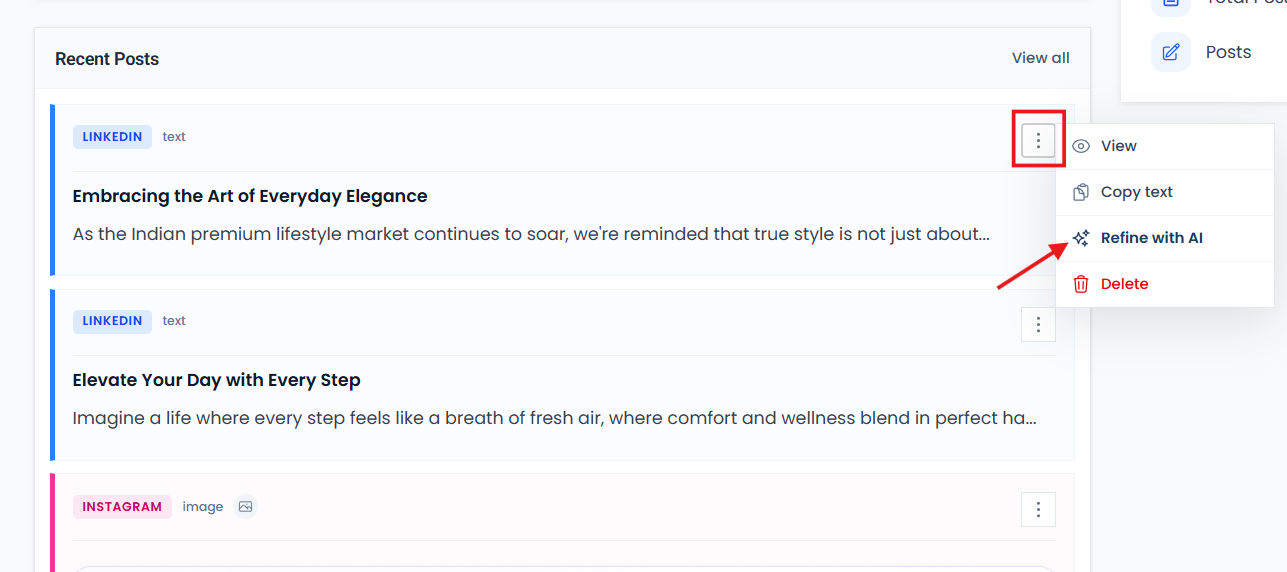
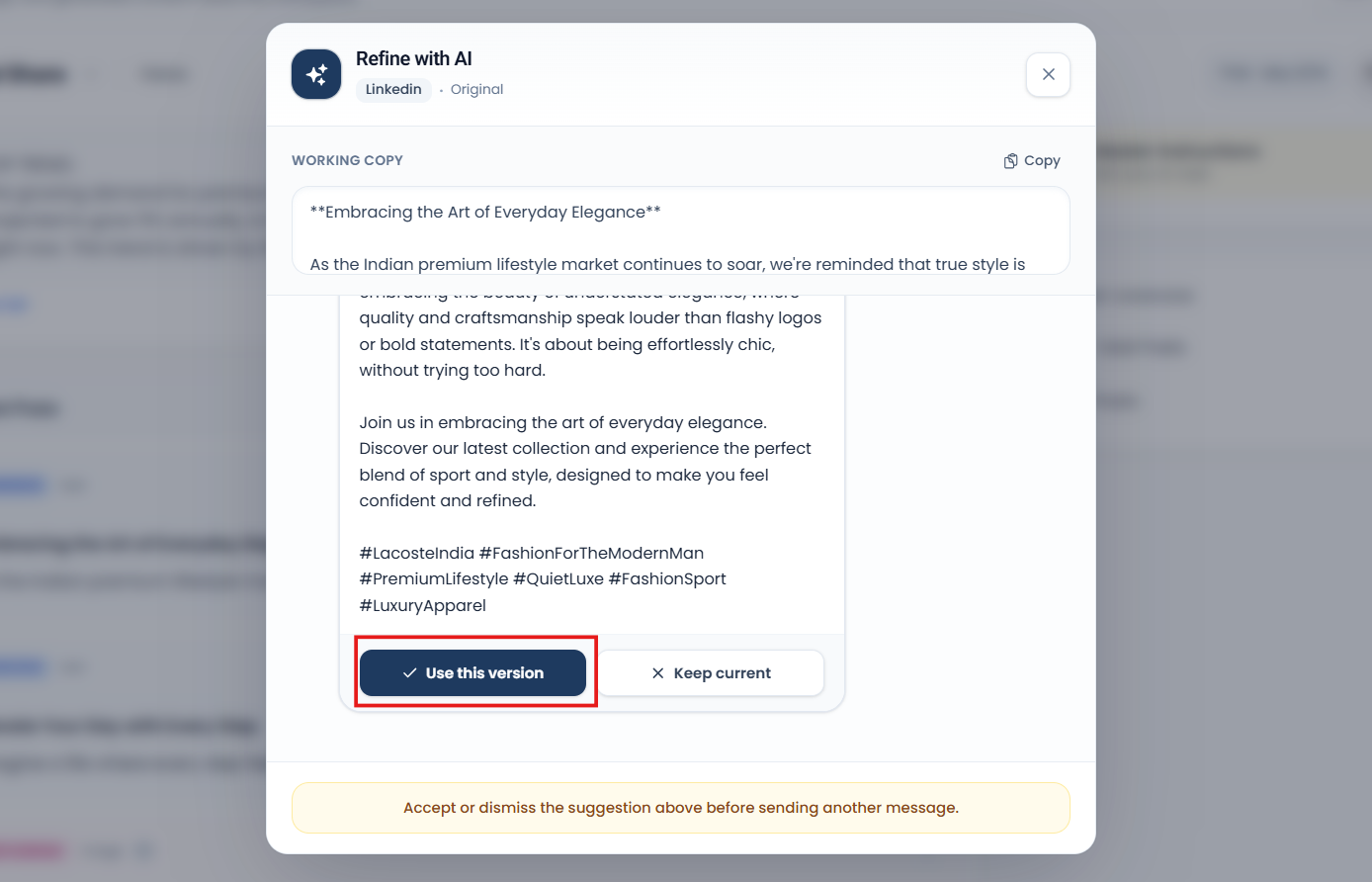
If you need to edit, click on the three dots. Go to "Refine with AI" and you can edit whatever you want here.
Click "Use this version" and your caption will be updated.
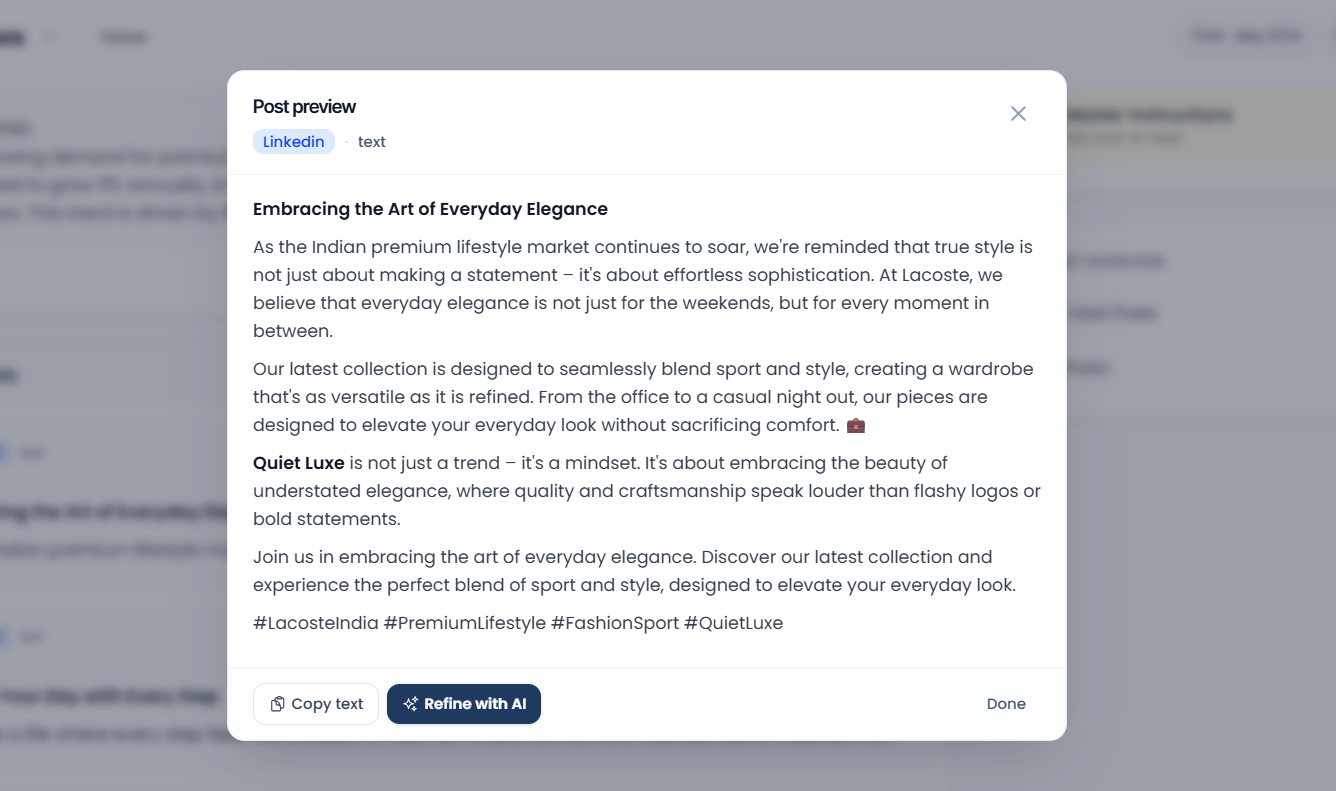
By clicking "View," you can see the captions to see how relevant and branded hashtags have been used.
This way, you can automate your workflow and make your work even easier.
You only need to do the research once, and then you can do it as much as you want.
Automate Your Copy Workflow
As a D2C founder, your primary focus should always be on building an incredible product and making sales, but a lack of understanding of social media marketing shouldn't stop your profile from growing organically. You do not need to spend hours staring at a blank text box, guessing what a caption needs to say, or copy-pasting generic hashtags that bury your post under irrelevant reach.
We understand that founders simply do not have the time to manually write and generate captions quickly. That is exactly why our tool allows you to handle your entire copy and hashtag strategy in one single place. You can customize your hooks, secure your branding, and automate your workflow to make your content creation process incredibly easy.
Once your workspace is ready, pin this recap of the workflow above when you batch captions:
- Analyze the Market: Go to Home, enter your competitor's site, and click on "Research". The tool will analyze the market and your competition to prepare a proper strategy for your brand's potential. Best of all, you only need to do this research once.
- Generate in Seconds: Click on "Generate Post", choose your platform, input your topic details, and click generate. A fully branded, ready-made caption will be generated for you in just 5-7 seconds.
- Refine and Polish: If you want to make any changes, click the three dots to use the "Refine with AI" feature. Type what you want to change, click "Use this version," and your copy instantly updates.
- Verify Your Strategy: Click on "View" to check your completed caption and ensure that your 3-5 relevant, branded hashtags are properly placed to naturally trigger the algorithm.
Stop letting your social media posts get left behind. Automate your content marketing workflow today, increase your daily productivity, and start uploading high-converting posts that convey your message clearly and encourage customers to buy.